# Inviting Management To CloudFlare

<span data-darkreader-inline-color="" style="color: rgb(0, 0, 0);">You will need to add us to your CloudFlare account so we can manage your DNS records and firewall rules accordingly.</span>

<span data-darkreader-inline-color="" style="color: rgb(0, 0, 0);">Head over to https://www.cloudflare.com/ and click "Log In" in the top right.</span>

<span data-darkreader-inline-color="" style="color: rgb(0, 0, 0);">![](https://jasmeow.pics/hO7NUs.png)</span>

<span data-darkreader-inline-color="" style="color: rgb(0, 0, 0);">Login with your details and 2FA code if required.</span>

<span data-darkreader-inline-color="" style="color: rgb(0, 0, 0);">![](https://jasmeow.pics/2LWPkx.png)</span>

<span data-darkreader-inline-color="" style="color: rgb(0, 0, 0);">You will be taken to a page that looks like the below. Do not click into one of your domains, stay on this screen. If you do click on a domain, click back by clicking the blue arrow just under the CloudFlare logo next to your domain name.</span>

<span data-darkreader-inline-color="" style="color: rgb(0, 0, 0);">![](https://jasmeow.pics/6f0Ndt.png)</span>

<span data-darkreader-inline-color="" style="color: rgb(0, 0, 0);">![](https://jasmeow.pics/Yf2JPd.png)</span>

<span data-darkreader-inline-color="" style="color: rgb(0, 0, 0);">In the bottom left, click "Manage Account" then "Members" should automatically select.</span>

<span data-darkreader-inline-color="" style="color: rgb(0, 0, 0);">![](https://jasmeow.pics/uQXKoM.png)</span>

<span data-darkreader-inline-color="" style="color: #000000;">Under the main members title, click the blue "**Invite members**" button.</span>

![image.png](https://docs.jasmeow.systems/uploads/images/gallery/2026-03/scaled-1680-/WauVp9aF3u6Y6NDu-image.png)

<span data-darkreader-inline-color="" style="color: rgb(0, 0, 0);">In the "Add email addresses" field, please type in **jasmine@jasmeow.systems** so I can be added. When you click the white "Add" button or hit enter, it will put it into a box underneath as shown below. Click "Create a policy" afterwards.</span>

![image.png](https://docs.jasmeow.systems/uploads/images/gallery/2026-03/scaled-1680-/EIdU2mg5AAw6jwFy-image.png)

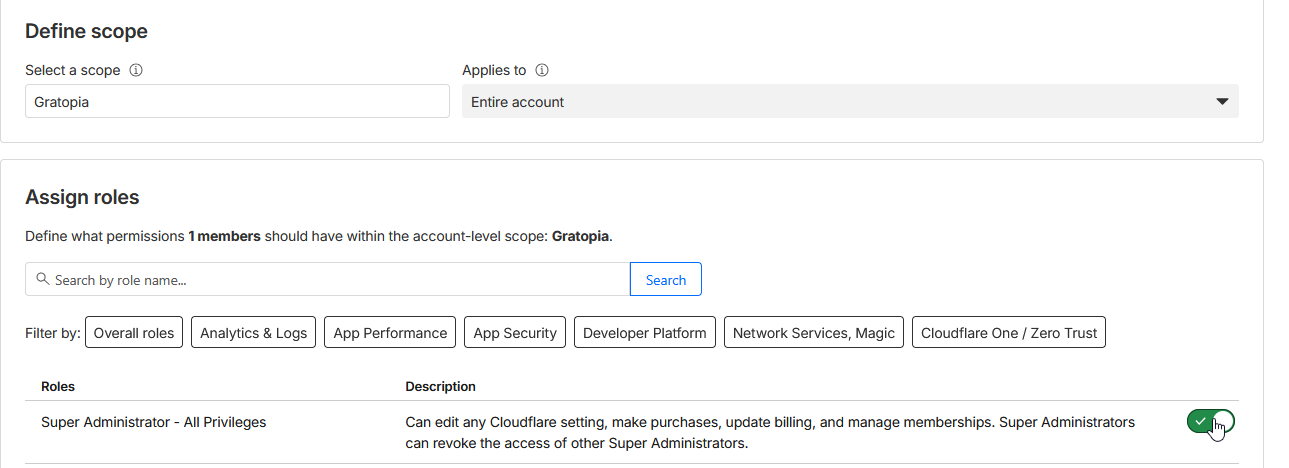
<span style="color: #000000;">Select the scope to be "Account Level" which will be your network name or email address.</span>

<p class="callout warning"><span style="color: #000000;"><span data-darkreader-inline-color="" style="color: rgb(0, 0, 0);">Please select *"**Account Level**"* and not *"**Domain Level**".* We are not interested in the other domains on your account if they are not related to your business or network unless you tell us to modify them. You cannot invite us as Super Administrators if you do not do this.</span></span></p>

<span style="color: #000000;">Click the "Super Administrator - All Privileges" toggle. Click Create policy at the bottom.</span>

![image.png](https://docs.jasmeow.systems/uploads/images/gallery/2026-03/scaled-1680-/chq8GKqwtzfgD5kG-image.png)

![image.png](https://docs.jasmeow.systems/uploads/images/gallery/2026-03/scaled-1680-/xVqiBdebU5ey7oKS-image.png)

<p class="callout warning align-left"><span data-darkreader-inline-color="" style="color: rgb(0, 0, 0);">Please invite us as *"Super Administrator - All Privileges"* and not anything else such as *"Administrator"* - This wastes time and proper setup where we need it in the future. We as a team aren't going to remove you and only the management team will need this role.</span></p>

<p class="callout info align-left"><span data-darkreader-inline-color="" style="color: rgb(0, 0, 0);">When we invite other system administrators to help on your network, we give them specific permissions for their job role. You don't need to worry about us changing your staff users or giving access where they shouldn't need it to other domains.</span></p>

<span style="color: rgb(0, 0, 0);">You will then be sent back to the invite members screen. Click the blue "Invite members" button.</span>

![](https://jasmeow.pics/IhMBXw.png)

<span data-darkreader-inline-color="" style="color: rgb(0, 0, 0);">You should see the email listed under the invite button as pending invite.</span>

[![image.png](https://docs.jasmeow.systems/uploads/images/gallery/2026-03/scaled-1680-/gqhyZnOpgK2bA75R-image.png)](https://docs.jasmeow.systems/uploads/images/gallery/2026-03/gqhyZnOpgK2bA75R-image.png)