# Configuring Centralised Plugins For Linked Database Access

<span style="color: rgb(0, 0, 0);">Plugins such as LiteBans and LuckPerms need to use the same database to communicate their information across all your servers successfully. There are many benefits to doing this rather than:</span>

- <span style="color: rgb(0, 0, 0);">Keeping your permissions in a flat file as they won't sync across all servers. This causes confusion for server owners with many ranks, having to remake them each time.</span>
- <span style="color: rgb(0, 0, 0);">Bans just being stored on one server so when they connect back through the Bungee network, they can join other servers, just not the one you banned them on!</span>

---

<p class="callout warning"><span style="color: rgb(0, 0, 0);">For each plugin, make a different database. Don't merge them together as it makes organisation a headache later on down the line when you want to migrate to a new system and tables are merged. You may also cause conflicts when the table names are the same such as different CoreProtect servers, as the prefix is always co\_, so linking your Hub and Survival together would cause data mismatches due to them both using the co\_block table.</span></p>

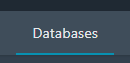
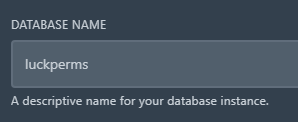
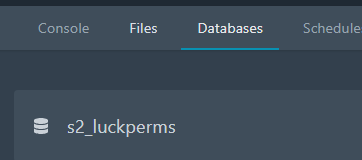
<span style="color: rgb(0, 0, 0);">Firstly, Pick a server on your panel and go to the "Databases" tab. Create a database for the plugin name. I would recommend making this database on the proxy as it's better to organise databases by location, such as:</span>

- <span style="color: rgb(0, 0, 0);">LuckPerms = Global = Proxy</span>
- <span style="color: rgb(0, 0, 0);">CoreProtect = One Server = Survival</span>

<p class="callout info"><span style="color: rgb(0, 0, 0);">For this example tutorial, we will be using LuckPerms. The same process applies to other global plugins.</span></p>

<span style="color: rgb(0, 0, 0);">![image.png](https://docs.jasmeow.systems/uploads/images/gallery/2023-07/scaled-1680-/gSCRDjfPc4TXCDEI-image.png) ![image.png](https://docs.jasmeow.systems/uploads/images/gallery/2023-07/scaled-1680-/pnj3mn3V2O0U4OcN-image.png) ![image.png](https://docs.jasmeow.systems/uploads/images/gallery/2023-07/scaled-1680-/x5XawMD4G1RiPkWP-image.png) ![image.png](https://docs.jasmeow.systems/uploads/images/gallery/2023-07/scaled-1680-/h3B6TalNMMctkkpZ-image.png)![image.png](https://docs.jasmeow.systems/uploads/images/gallery/2023-07/scaled-1680-/QX3sdTNtfVbCmRPl-image.png)</span>

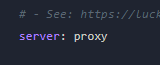
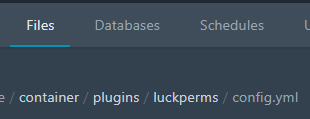
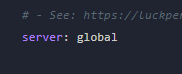
<span style="color: rgb(0, 0, 0);">Go to the File Manager &gt; Plugins &gt; LuckPerms &gt; config.yml. Scroll down and firstly set the server name to "Proxy" or "Bungee" so LuckPerms knows it's the proxy.</span>

<span style="color: rgb(0, 0, 0);">![image.png](https://docs.jasmeow.systems/uploads/images/gallery/2023-07/scaled-1680-/M6mBDYgEIy595PZq-image.png)</span>

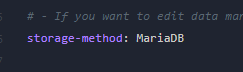
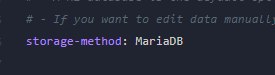
<span style="color: rgb(0, 0, 0);">In the storage-method variable, set it to "MariaDB" from H2 to start linking to the database.</span>

<span style="color: rgb(0, 0, 0);">![image.png](https://docs.jasmeow.systems/uploads/images/gallery/2023-07/scaled-1680-/SFxH9Tjy9Z6aRr7J-image.png)</span>

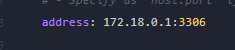
<span style="color: rgb(0, 0, 0);"><span style="color: #000000;">Scroll down a bit more and find the address. Replace with *172.18.0.1* as the IP and some plugins require "3306" as a colon next to the IP, some have a dedicated option for the port such as Port: 3306.</span></span>

<span style="color: rgb(0, 0, 0);">![image.png](https://docs.jasmeow.systems/uploads/images/gallery/2023-07/scaled-1680-/uA7H4OqvpyJH5rE5-image.png)</span>

<span style="color: rgb(0, 0, 0);">Right click the tab with "Duplicate" then you will have one tab which has the configuration file open on it, and the other one you can click back to the *Databases* tab on the panel.</span>

<span style="color: rgb(0, 0, 0);">![image.png](https://docs.jasmeow.systems/uploads/images/gallery/2023-07/scaled-1680-/I2YnwBsF1ijLSEUq-image.png) ![image.png](https://docs.jasmeow.systems/uploads/images/gallery/2023-07/scaled-1680-/BtsGrnyDyndTsI9I-image.png) ![image.png](https://docs.jasmeow.systems/uploads/images/gallery/2023-07/scaled-1680-/g4xduuxRAnvclHsm-image.png)</span>

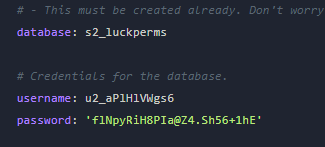
<span style="color: rgb(0, 0, 0);">Copy the database name by clicking it on the panel, in our case, s2\_luckperms, and then putting it into the config. Repeat the same for the username. For the password, click the eye symbol and you will see the password to also put into the config.</span>

<span style="color: rgb(0, 0, 0);">![image.png](https://docs.jasmeow.systems/uploads/images/gallery/2023-07/scaled-1680-/LTM7szINML2ZPVsS-image.png) ![image.png](https://docs.jasmeow.systems/uploads/images/gallery/2023-07/scaled-1680-/URVsvj6rxyZopUaj-image.png)</span>

<span style="color: rgb(0, 0, 0);">You can now save it with Ctrl + S or the "Save Content" button.</span>

<span style="color: rgb(0, 0, 0);">![image.png](https://docs.jasmeow.systems/uploads/images/gallery/2023-07/scaled-1680-/aNAjvSwPEOmDfVnI-image.png)</span>

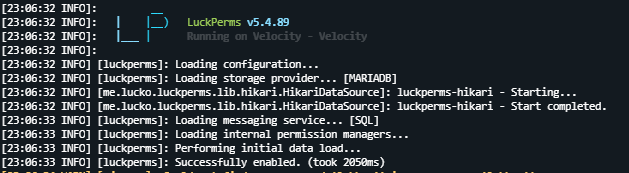
<span style="color: rgb(0, 0, 0);">You can now restart the server and it will link successfully to the database.</span>

<span style="color: rgb(0, 0, 0);">![image.png](https://docs.jasmeow.systems/uploads/images/gallery/2023-07/scaled-1680-/ogwHKuLsAiXa7aOo-image.png)</span>

<span style="color: rgb(0, 0, 0);">For the other servers, basically copy and paste the host, database, username and password onto your clipboard, pop onto the next server, and just edit the server name and storage-method. For example, let's go to the Hub. We need to rename the server to "Hub", set the storage-method to "MariaDB" then paste in our database information from the proxy, or you can follow the duplicate tab &gt; click and paste method above, whichever is easier for you.</span>

<span style="color: rgb(0, 0, 0);">![image.png](https://docs.jasmeow.systems/uploads/images/gallery/2023-07/scaled-1680-/KYC6Zd8TwCAIVqtW-image.png) ![image.png](https://docs.jasmeow.systems/uploads/images/gallery/2023-07/scaled-1680-/PL9VF4Ii90HO5tu7-image.png)</span>

<span style="color: rgb(0, 0, 0);">Provided an example GIF below of how you can simply just copy and paste the details over.</span>

<span style="color: rgb(0, 0, 0);">![](https://jasmeow.pics/ThM9Ac.gif)</span>

<span style="color: rgb(0, 0, 0);">Restart the server and it will link to the same database!</span>