# Typical Pterodactyl Errors In Console & Solving Them
##### **"Unable to access jarfile xxx.jar"**
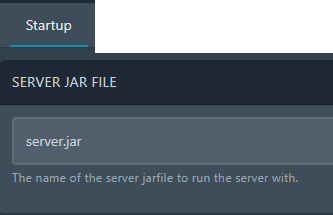
**Use. Common. Sense.** This is the most irritating one we get asked literally every day. No, your server didn't crash, it didn't break, it didn't blow up. **Read the error.** It is clearly asking that it cannot find the jar file on start up. If you see the start up line just before it states the error, you can see in my example it is called "server.jar". We need to change this. Go to the "Startup" tab along the top and update the jar file name. Your file called "BungeeCord.jar"? Put that in there and start the server again. *Note:* **CaSe SeNSiTiVe.**
 [](https://docs.jasmeow.systems/uploads/images/gallery/2023-11/HoFJ95ZWgrmjMOTU-image.png)
##### **"Cannot find module './index.js'"**
Same as above, the file doesn't exist. It could be located in /src/index.js for example, and if it is, you need to go to the Startup tab and update that parameter in the Main File section.
 
##### **"Exception in thread "main"..."**
This error is usually caused by selecting the wrong Java version for the docker container. For example, you put on a Paper 1.8 jar but the server is using docker image Java 17. Normally the panel or jar file will be smart and explicitly state "Oi, wrong version, update it" but some jar files can't do that or haven't got that built in. Another reason for the below is due to a corrupt server jar so download a new one from the site you got it from or use a different one if it is broken.

##### **"bind: cannot assign requested address"**
Big scary red error but actually a very simple one - Your dedicated system has IP's and to manage them they use something called network adapters. If none of the adapters has the address specified, it won't "bind", as in, "I can't see it, did you type the number right?". For example, 1.1.1.1 would not ever exist on your system, so you can see where it states **tcp4 1.1.1.1**, meaning it cannot find that particular IP. Normally happens if you have multiple IP's you ordered from your hosting provider, tried to use one on the panel, but forgot that you need to **ip addr add** or **netplan** them first on the system. Ask us for assistance if you are adding additional IP's as this can get confusing with networking very quickly. The rest of the error is just the server UUID and a bunch of waffle.
##### 
##### "**bind: address already in use**"
If I have a server or service using the same port, it will state this error. Very obvious to solve - Find what is using that port and stop it, turn it off, or change your current servers port to something else. Might require use to investigate if the local system has locked up that port and is actually available. 
##### "**Invalid maximum heap size: -Xmx0M**"
This is due to setting your "Allocated Memory" RAM limit on your panel to 0 and have the variable flag **-Xmx{{SERVER\_MEMORY}}M** included in your start up command. Basically, the panel states "Setting this to 0 will allow unlimited memory in a container" but Java doesn't work like this and if the line exists, it means that it will try and use maximum RAM of 0. The panel was recently updated within the past year to remove this *-Xmx* line and only have the *-Xms* (minimum) due to the poor wording and confusion this had with not so technically minded users of the panel. Now when you set it to 0, it will really use all the memory it can get for the container, so normally you use Aikar flags to make the RAM **-Xms8G -Xmx8G** for example.


##### "**daemon: network pterodactyl\_nw not found.**"
**EXTREMELY rare.** Reinstall docker using the standardized docker commands from Pterodactyl's website and then start the container again. Still failing? Pull the latest wings configuration from the node and update it, then restart wings. Ask us to solve this problem for more troubleshooting.

##### "**NODE\_MODULE\_VERSION xxx. This version requires *higher/lower*...**"
[](https://docs.jasmeow.systems/uploads/images/gallery/2023-11/vXaCk5Yl4PQzLXEt-image.png)
This means that you have the wrong NodeJS version selected on the Startup tab, needing to switch to a higher version. You can find them here - [https://nodejs.org/en/download/releases](https://nodejs.org/en/download/releases)
