# Wings Daemon Causing Containers To Null Route Or Can't Reach Internet
Sometimes the wings daemon doesn't pass along route configuration properly to the docker containers which in turn break DNS and access for plugins to the outside internet. There are two solutions you can try, one is minor and the other is major, dependent on your infrastructure.
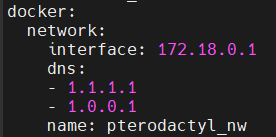
Run `nano /etc/pterodactyl/config.yml` and find the DNS entries under the docker header.
[](https://docs.jasmeow.systems/uploads/images/gallery/2023-07/71s6CZZ18WBHeief-image.png)
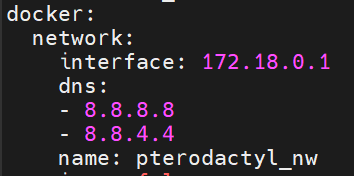
You will notice that the DNS entries are set to CloudFlare, and this is normally the case on every system. We will need to set these to Google, *8.8.8.8* and *8.8.4.4*. CloudFlare is not always better in every case and can actually cause DNS problems on software not routed through their CDN's.
[](https://docs.jasmeow.systems/uploads/images/gallery/2023-07/l4ZWIfokhLKh9dUN-image.png)
Save the file, Ctrl + X, Y then Enter. Restart wings with `systemctl restart wings`.
Start/restart your server and see if you have the same problem. If you still are experiencing a connection issue, try the solution below.
This is **dangerous** to do on a hosted client node, such as a hosting company with multiple clients accessing their servers. It's relatively fine if it's just one client with a managed dedicated system, but don't always use this solution as a "go-to" and say job done. It's basically setting the internal networking for docker to the host and not pterodactyl's internal adapter, which can cause plugins to maliciously break out into the root system and containers to speak to the root system which is disabled by default.
Nano back into the wings configuration file and change the network mode under the docker section to "host" instead of "pterodactyl\_nw".

Restart wings using the same command. The issue will be permanently resolved as it's using the root systems network and configuration. Still not working? Reach out to one of the system administrators.