# Accessing Your System Using OpenVPN Due To Dynamic IP

<span style="color: rgb(0, 0, 0);">You or some of your team members might have home internet where the IP changes repeatedly after a few hours or days, causing a headache where you have to ask us to whitelist your home IP each time to access SFTP or SSH. Please follow this guide to install OpenVPN Community, import your VPN profile, connect then open MobaXTerm/FileZilla.</span>

<span style="color: rgb(0, 0, 0);">First off, use one of the following taken from OpenVPN's site:</span>

- [https://swupdate.openvpn.org/community/releases/OpenVPN-2.6.6-I001-amd64.msi](https://swupdate.openvpn.org/community/releases/OpenVPN-2.6.6-I001-amd64.msi)
- [https://openvpn.net/downloads/openvpn-connect-v3-macos.dmg](https://openvpn.net/downloads/openvpn-connect-v3-macos.dmg)

<span style="color: rgb(0, 0, 0);">***Easter Egg** - Go to [https://swupdate.openvpn.org/community/](https://swupdate.openvpn.org/community/) for it to say "no" to you.*</span>

<span style="color: rgb(0, 0, 0);">Install the software.</span>

<span style="color: rgb(0, 0, 0);">![](https://jasmeow.pics/5iJgZb.png) ![](https://jasmeow.pics/MqZ7hT.png)</span>

<span style="color: rgb(0, 0, 0);">Ignore the error and press OK.</span>

<p class="callout info"><span style="color: rgb(0, 0, 0);">This guide was written for Windows but the MacOS steps are relatively similar.</span></p>

<span style="color: rgb(0, 0, 0);">![](https://jasmeow.pics/6oXvGV.png)</span>

<span style="color: rgb(0, 0, 0);">Grab your VPN file from your **💬-comms-chat** or from whoever passed it onto you and download it. Double click it and it will ask to import. Press Yes. You should see a notification stating it was successful. In the system tray, you will see a little computer icon with a padlock on it. Right click it &gt; Connect.</span>

![](https://jasmeow.pics/tFfNGk.png)![](https://jasmeow.pics/nxKijf.png) ![](https://jasmeow.pics/V8pKY0.png)

![](https://jasmeow.pics/pGNoUj.png)

<span style="color: rgb(0, 0, 0);">You should now see the screen turn green.</span>

<span style="color: rgb(0, 0, 0);">![](https://docs.jasmeow.systems/uploads/images/gallery/2023-10/QQTTXpUE3h0BwSgD-embedded-image-dgoupizj.png)</span>

<span style="color: rgb(0, 0, 0);">Drag the icon onto your taskbar to make it easier to see.</span><span style="color: rgb(0, 0, 0);">![](https://docs.jasmeow.systems/uploads/images/gallery/2023-10/sVysokn8ZOMBjksS-embedded-image-2n99vwyj.png)</span>

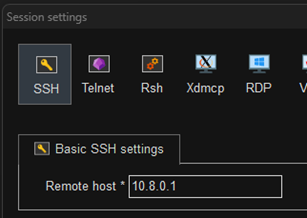
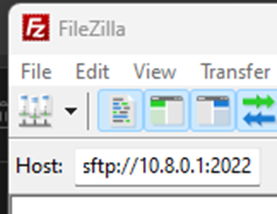
<span style="color: rgb(0, 0, 0);">Now that you are connected, the host is **10.8.0.1** so if you use a connection type like SSH or SFTP, u</span><span style="color: rgb(0, 0, 0);">se this IP instead of the public IP. For example:</span>

![](https://docs.jasmeow.systems/uploads/images/gallery/2023-10/ZsjAHy68StinOXyP-embedded-image-aoeswjpb.png) ![](https://docs.jasmeow.systems/uploads/images/gallery/2023-10/4ehb8Niv03QNljoc-embedded-image-uvezucy9.png)

<span style="color: rgb(0, 0, 0);">Any problems, speak to one of the team.</span>