# Got High Ping/Connection Issues? The Diagnostic Steps To Help Us

<span style="color: rgb(0, 0, 0);">Hello! Having some issues playing on your favorite server due to high ping being over 150ms or connection issues like timing out or falling into the void? Follow the guide below to help us work out where the issue lies.</span>

<span style="color: rgb(0, 0, 0);">To start with, let's try trace routing our pathing to our DDoS provider, TCP Shield. We will use this as a baseline to diagnose the faulty connection to your home.</span>

<p class="callout info"><span style="color: rgb(0, 0, 0);">A traceroute provides a map of how data on the internet travels from its source to its destination. When you connect with a website, the data you get must travel across multiple devices and networks along the way, particularly routers.</span></p>

<span style="color: rgb(0, 0, 0);">Go to <span style="color: rgb(35, 111, 161);">[https://sourceforge.net/projects/winmtr/](https://sourceforge.net/projects/winmtr/)</span> and download the WinMTR project. This will be very helpful in working out what the fault is.</span>

<p class="callout warning"><span style="color: rgb(0, 0, 0);">What we are doing is safe and your antivirus program shouldn't flag anything. As long as you follow the instructions, you won't need to worry about personal data being shared as this is all networking diagnostics which is openly available for anyone to do.</span></p>

<span style="color: rgb(0, 0, 0);">Don't accept the cookies. You don't want to be bothered by tracking and advertisements!</span>

<span style="color: rgb(0, 0, 0);">![image.png](https://docs.jasmeow.systems/uploads/images/gallery/2023-08/scaled-1680-/gJ7kfOI4aYlid3gi-image.png)</span>

<span style="color: rgb(0, 0, 0);">And press Download.</span>

<span style="color: rgb(0, 0, 0);">![image.png](https://docs.jasmeow.systems/uploads/images/gallery/2023-08/scaled-1680-/uqeVo6YQ8iA35vwK-image.png)</span>

<span style="color: rgb(0, 0, 0);">Wait for it to download.</span>

<span style="color: rgb(0, 0, 0);">![image.png](https://docs.jasmeow.systems/uploads/images/gallery/2023-08/scaled-1680-/gs8Vmz7hjZJIsizX-image.png)</span>

<span style="color: rgb(0, 0, 0);">Open the ZIP file which downloads.</span>

<span style="color: rgb(0, 0, 0);">![image.png](https://docs.jasmeow.systems/uploads/images/gallery/2023-08/scaled-1680-/5JCMFlP1q2OoZ7VH-image.png)</span>

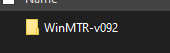
<span style="color: rgb(0, 0, 0);">Go into these folders. and open the "WinMTR.exe" file.</span>

<span style="color: rgb(0, 0, 0);">![image.png](https://docs.jasmeow.systems/uploads/images/gallery/2023-08/scaled-1680-/w8JzXXNCkzuYljoL-image.png) ![image.png](https://docs.jasmeow.systems/uploads/images/gallery/2023-08/scaled-1680-/9HOiT7OiHSVB8dOL-image.png) ![image.png](https://docs.jasmeow.systems/uploads/images/gallery/2023-08/scaled-1680-/GxTo1Q2l6AXh6aX3-image.png)</span>

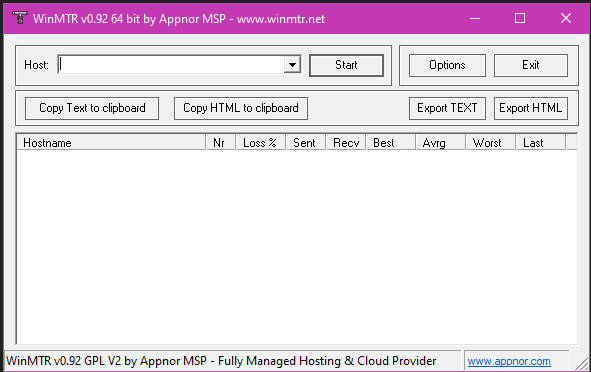
<span style="color: rgb(0, 0, 0);">Click "Run" and wait for the below box to appear. If it doesn't, go back and run the x32 bit version of the software and run the WinMTR.exe again.</span>

<span style="color: rgb(0, 0, 0);">![](https://jasmeow.pics/GylCNV.png)</span>

<span style="color: rgb(0, 0, 0);">![image.png](https://docs.jasmeow.systems/uploads/images/gallery/2023-08/scaled-1680-/MaLQMMRwRQVBB0Tn-image.png)</span>

<span style="color: rgb(0, 0, 0);">In the box in the top left, you have "Host:", pop in that box with the servers joining domain. For example, "**hypixel.net**", "**play.jasmeow.systems**", etc.</span>

![image.png](https://docs.jasmeow.systems/uploads/images/gallery/2023-08/scaled-1680-/2nlLLcL0H6zr0A8Y-image.png)

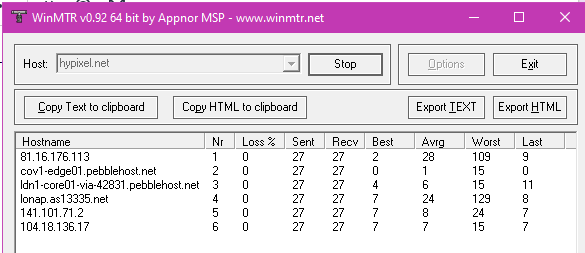
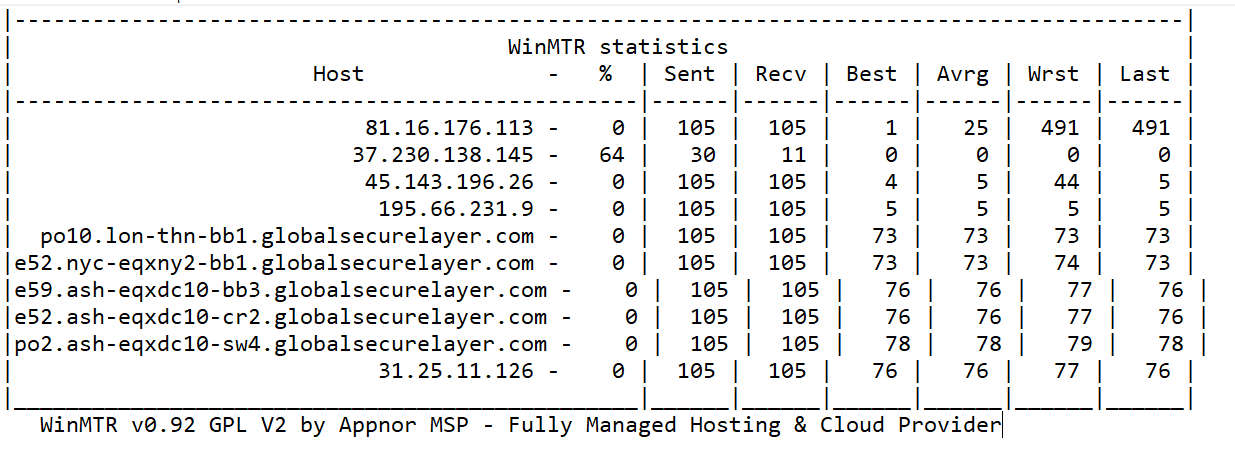
<span style="color: rgb(0, 0, 0);">Leave this to run for about a minute or when the *Sent* number reaches about 100. This will help us diagnose and get more information about how you *travel* through the internet and reaching your MC server. Press "Stop" and you will see something similar to the below: </span>
<span style="color: rgb(0, 0, 0);">![image.png](https://docs.jasmeow.systems/uploads/images/gallery/2023-08/scaled-1680-/Xom9dk5ZBRuqoBhl-image.png)</span>

<span style="color: rgb(0, 0, 0);">Along the top, there's a button called "Copy Text to clipboard". Click this and paste it into your ticket with the staff member/directly with the Jasmeow.Systems team.</span>

<span style="color: rgb(0, 0, 0);">![image.png](https://docs.jasmeow.systems/uploads/images/gallery/2023-08/scaled-1680-/OnOfjTJ2u1ppD5A7-image.png)</span>

<span style="color: rgb(0, 0, 0);">Finally, go to <span style="color: rgb(35, 111, 161);">[https://ifconfig.me/](https://ifconfig.me/) </span>and state your IP address. This will be extremely helpful in seeing if a provider is blocking you from accessing the MC network you want to join. </span>

<span style="color: rgb(0, 0, 0);">![](https://jasmeow.pics/zoXkiw.png)</span>

<span style="color: rgb(0, 0, 0);">T**his should be all for now. If you need to do anything else, we will let you know.**</span>